ASRock MB Sc AM5 X870E TAICHI OCF, AMD X870E, 2xDDR5, WiFi, 1xHDMI, 2xUSB4


Formát základní desky:ATX; Chipset:AMD X870; Socket (patice):Socket AM5 (LGA 1718); Pro procesory:AMD; Technologie paměti RAM:DDR5; Počet paměťových slotů:2; M.2 slot:6; SATA 3:2; Podpora RAID:0, 1, 10; PCI Express x16:2; PCI Express x8:0; PCI Express x1:0; PCI:0; LAN:2.5Gbit/s; Bezdrátové připojení:WiFi + Bluetooth; DisplayPort:0; HDMI:1; VGA:0; DVI:0
Podrobnosti
ASRock X870E Taichi OCF
ASRock flagship Taichi lineup now unifies water cooling, extreme overclocking, and creator platforms under one brand.
Marking the debut of X870E Taichi OCF, ASRock expands the X870 lineup and continues to grow the Taichi family on the AM5 platform.
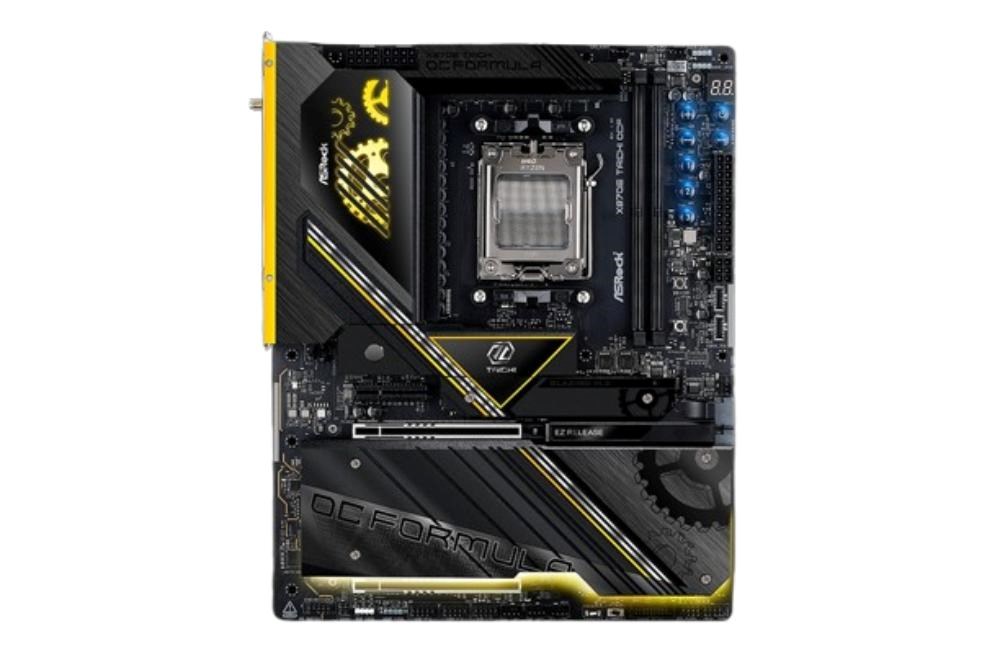
Unique Feature
Superb Productivity
- PCIe Gen5 (Graphics, M.2)
- Dual Channel DDR5
- USB4 Type-C Ports (40 Gb/s)
- 6 x M.2 Sockets
Rock-Solid Durability
- Server-Grade Low-Loss PCB
- 22+2+1 Power Phase, 110A SPS for Vcore+SOC with Enlarged Heatsink Armor
- Flexible Integrated I/O Shield
- 20K Long-lasting Black Caps (high quality and conductive polymer capacitors) Ultrafast Gaming
- 5G LAN, 802.11be Wi-Fi 7 Module
Professional Overclocking
- ASRock Hyper BCLK Engine
- Physical OC Buttons
- V-Probe™
EZ Update
- BIOS Flashback Button
- ASRock Auto Driver Installer
CPU
- Supports AMD Socket AM5 Ryzen™ 9000, 8000 and 7000 Series Processors*
- Supports ASRock Hyper BCLK Engine
* The availability of expansion slots may vary by CPU. Please refer to PCIe/M.2 Bandwidth Table for details.
Chipset
- AMD X870E
Memory
- Dual Channel DDR5 Memory Technology
- 2 x DDR5 DIMM Expansion Slots
- AMD Ryzen™ 9000 Series Processors supports DDR5 ECC/non-ECC, un-buffered memory up to 8400+(OC)*
- AMD Ryzen™ 8000 Series Processors supports DDR5 ECC/non-ECC, un-buffered memory up to 10400+(OC)*
- AMD Ryzen™ 7000 Series Processors supports DDR5 ECC/non-ECC, un-buffered memory up to 8000+(OC)*
- Max. capacity of system memory: 128GB*
- Supports Extreme Memory Profile (XMP) and EXTended Profiles for Overclocking (EXPO) memory modules
* Please refer to Memory Support List on ASRock's website for more information.
**Due to the operating system limitation, the actual memory size may be less than 4GB for the reservation for system usage under Windows 32-bit OS. For Windows 64-bit OS with 64-bit CPU, there is no such limitation.
BIOS
- 2 x 512Mb AMI UEFI Legal BIOS with GUI support
Graphics
Integrated AMD RDNA™ graphics (Actual support may vary by CPU)
- 1 x HDMI 2.1 TMDS/FRL 8G Compatible, supports HDR, HDCP 2.3 and max. resolution up to 4K 120Hz
- 2 x USB4, support HDCP 2.3 and max. resolution up to 8K 30Hz*
* Only the CPU's embedded graphics can be displayed through USB4 ports.
If you want to display to a Type-C monitor, please use AM5 Ryzen™ 9000, 8000 and 7000 processors with embedded graphics.
USB4 controller (for USB4_TC1 and USB4_TC2) will run at Gen4x2 with with 8000 (Phoenix 2) series processors.
Audio
- 5.1 CH HD Audio with Content Protection (Realtek ALC4082 Audio Codec)
- WIMA Audio Capacitors (For Rear Outputs)
- ESS SABRE9219 DAC for Rear Panel Audio (130dB SNR)
- Individual PCB Layers for R/L Audio Channel
- Direct Drive Technology on Front headphone port (Supports up to 600 Ohm headsets)
- Nahimic Audio
LAN
- 5 Gigabit LAN 10/100/1000/2500/5000 Mb/s
- Realtek RTL8126
Wireless Communication module
- 802.11be 2x2 Wi-Fi 7 Module
- Supports IEEE 802.11a/b/g/n/ac/ax/axe/be
- Supports 2.4GHz/5GHz/6GHz
* frequency band
- Supports 160MHz channel bandwidth with 6GHz
* frequency band
- 1 antenna to support 2 (Transmit) x 2 (Receive) diversity technology
- Supports Bluetooth 5.4
- Supports MU-MIMO
* The Wi-Fi 7 module is supported by Microsoft Windows 11 only.
There is no driver available for Windows 10.
The availability of the 6GHz band will depend on the different regulation status of each country and region. It will be activated (for supported countries) through Windows Update and software updates once available.
Expansion Slots
CPU:
- 2 x PCIe 5.0 x16 Expansion Slots (PCIE2 and PCIE3), support x16 or x8/x8 modes*
Chipset:
- 1 x PCIe 4.0 x4 Slot (PCIE1), supports x4 mode*
- 1 x Vertical M.2 Socket (Key E), supports type 2230 WiFi/BT PCIe WiFi module
- Supports AMD CrossFire™
* PCIE2 will run at Gen5x16 with 9000 and 7000 series processors, Gen4x8 with 8000 (Phoenix 1) series processors and Gen4x4 with 8000 (Phoenix 2) series processors.
PCIE3 will be unavailable with 8000 (Phoenix 1 and Phoenix 2) series processors.
If M2_3 is occupied, PCIE1 will downgrade to x2 mode.
Supports NVMe SSD as boot disks
Storage
CPU:
- 1 x Blazing M.2 Socket (M2_1, Key M), supports type 2280 PCIe Gen5x4 (128 Gb/s) mode*
- 1 x Blazing M.2 Socket (M2_2, Key M), supports type 2280 PCIe Gen5x4 (128 Gb/s) mode*
Chipset:
- 1 x M.2 Socket (M2_3, Key M), supports type 2280 PCIe Gen4x2 (32 Gb/s) mode*
- 1 x Hyper M.2 Socket (M2_4, Key M), supports type 2280 PCIe Gen4x4 (64 Gb/s) mode*
- 1 x Ultra M.2 Socket (M2_5, Key M), supports type 2280 PCIe Gen3x4 (32 Gb/s) mode*
- 1 x Hyper M.2 Socket (M2_6, Key M), supports type 2280 PCIe Gen4x4 (64 Gb/s) mode*
- 2 x SATA3 6.0 Gb/s Internal I/O Connectorss*
* Supports NVMe SSD as boot disks
M2_1 is the first priority for M.2 installation.
M2_1 will run at Gen5x4 with 9000 and 7000 series processors and Gen4x4 with 8000 (Phoenix 1 and Phoenix 2) series processors.
If M2_2 is occupied, both rear USB4 Type-C Ports and M2_2 will downgrade to x2 mode.
You can switch M2_2 to x4 mode in BIOS setting, but doing so will disable USB4_TC1 and USB4_TC2.
If M2_3 is occupied, PCIE1 will downgrade to x2 mode.
RAID
- Supports RAID 0 and RAID 1 for SATA storage devices
- Supports RAID 0, RAID 1 and RAID 10 for M.2 NVMe storage devices
USB
CPU:
- 2 x USB4 Type-C (Rear)
- 2 x USB 3.2 Gen2 Type-A (Rear (USB32_23))
Chipset:
- 2 x USB 3.2 Gen2x2 Type-C (Front)
- 5 x USB 3.2 Gen2 Type-A (Rear (USB32_1, USB32_456 and USB32_7))
- 1 x USB 3.2 Gen2 Type-C (Rear)
- 2 x USB 3.2 Gen1 Type-A (Front)
- 8 x USB 2.0 (2 Rear, 6 Front)
* All USB ports support ESD Protection
Internal I/O Connectors
- 2 x Thermistor Cable Headers
- 1 x Power LED and Speaker Header
- 1 x RGB LED Header*
- 3 x Addressable LED Headers**
- 2 x CPU Fan Internal I/O Connectors (4-pin) (Smart Fan Speed Control)***
- 4 x Chassis Fan Internal I/O Connectorss (4-pin) (Smart Fan Speed Control)***
- 1 x AIO Pump Fan Internal I/O Connectors (4-pin) (Smart Fan Speed Control)***
- 1 x 24 pin ATX Power Internal I/O Connectors (Hi-Density Power Internal I/O Connectors)
- 2 x 8 pin 12V Power Internal I/O Connectorss (Hi-Density Power Internal I/O Connectors)
- 1 x 6 pin Graphics 12V Power Internal I/O Connectors (Hi-Density Power Internal I/O Connectors)****
- 1 x Front Panel Audio Internal I/O Connectors (15µ Gold Audio Internal I/O Connectors)
- 3 x USB 2.0 Headers (Support 6 USB 2.0 ports)
- 1 x USB 3.2 Gen1 Header (Support 2 USB 3.2 Gen1 ports)
- 2 x Front Panel Type C USB 3.2 Gen2x2 Headers (20 Gb/s)*****
- 1 x Dr. Debug with LED
- 1 x Power Button with LED
- 1 x Reset Button with LED
- 1 x Retry Button
- 1 x Safe Boot Button
- V-Probe™: 6-set of onboard voltage measurement points laid
- Rapid OC Buttons: +/- buttons to adjust OC frequency
- 1 x Slow Mode Switch
- 1 x LN2 Mode Switch
- 1 x NickShih's OC Profile 1 Button with LED
- 1 x NickShih's OC Profile 2 Button with LED
- 1 x NickShih's OC Profile 3 Button with LED
* Supports in total up to 12V/3A, 36W LED Strip
** Support in total up to 5V/3A, 15W LED Strip
*** CPU_FAN1 supports the fan power up to 1A (12W).
CPU_FAN2, CHA_FAN1~4 and AIO_PUMP support the fan power up to 3A (36W).
CPU_FAN2, CHA_FAN1~4 and AIO_PUMP can auto detect if 3-pin or 4-pin fan is in use.
**** It is recommended to connect a 6 pin PCIE 12V Power Cable to GFX_36WTC2_12V1 when you use both USB32_TC2 and PCIe Expansion Slots.
***** USB32_TC2 supports USB PD 3.0 up to 12V@3A (36W) charging; USB32_TC3 supports USB PD 3.0 up to 5V@3A (15W) charging.
Back Panel I/O Ports
- 2 x Antenna Ports
- 1 x PS/2 Mouse/Keyboard Port
- 1 x HDMI Port
- 1 x Optical SPDIF Out Port
- 2 x USB4 Type-C Ports (40 Gb/s)*
- 7 x USB 3.2 Gen2 Type-A Ports (10 Gb/s)
- 1 x USB 3.2 Gen2 Type-C Port (10 Gb/s)
- 2 x USB 2.0 Ports
- 1 x RJ-45 LAN Port
- 1 x Clear CMOS Button
- 1 x BIOS Flashback Button
- 1 x BIOS Selection Switch
- 1 x Line Out Jack (Gold Audio Jack)
- 1 x Microphone Input Jack (Gold Audio Jack)
* Supports USB PD 3.0 up to 5V@3A (15W) charging
USB4 controller(for USB4_TC1 and USB4_TC2) will run at Gen4x2 with with 8000 (Phoenix 2) series processors.
Software and UEFI
Software
- ASRock Formula Drive
- ASRock Polychrome SYNC*
UEFI
- ASRock EZ Mode
- ASRock Full HD UEFI
- ASRock Auto Driver Installer
- ASRock Instant Flash
*These utilities can be downloaded from ASRock Live Update & APP Shop.
Accessories
- 2 x SATA Data Cables
- 1 x ASRock WiFi 2.4/5/6 GHz Antenna
- 1 x DRAM Cooling Fan
- 1 x ARGB Splitter Cable
- 2 x Thermistor Cables
Form Factor
- ATX Form Factor: 12.0-in x 9.6-in, 30.5 cm x 24.4 cm
- 10 Layer PCB
- 2oz Copper PCB
OS
- Microsoft Windows 10 64-bit / 11 64-bit
Certifications
- FCC, CE
- ErP/EuP ready (ErP/EuP ready power supply is required)
Technické parametry
| Pro procesory | AMD |
|---|---|
| Počet paměťových slotů | 2 |
| 3.5mm Jack | Ano |
| LAN | 2.5Gbit/s |
| DisplayPort | 0 |
| Bezdrátové připojení | WiFi + Bluetooth |
| Led Header | Ano |
| TPM | Ne |
| PCI Express x1 | 0 |
| USB 2 | 8 |
| USB 3 | 9 |
| USB C | 3 |
| PCI | 0 |
| M.2 slot | 6 |
| SATA 3 | 2 |
| VGA | 0 |
| DVI | 0 |
| HDMI | 1 |
| DisplayPort Type-C | 0 |
| Počet Thunderbolt | 2 |
| PCI Express x8 | 0 |
| COM port | Ne |
| LPT port | Ne |
| Socket (patice) | Socket AM5 (LGA 1718) |
| Formát základní desky | ATX |
| Chipset | AMD X870 |
| Technologie paměti RAM | DDR5 |
| PCI Express x16 | 2 |
| Podpora RAID | 0 |